PROJECT / NATIVE MAC UTILITY
Dust Off
A guided Mac cleanup tool that makes the next decision clear: inspect what was found, choose what to remove, and review the result.
Version 0.1.0 · Apple silicon · macOS 26+. Direct distribution through a signed, notarised DMG.
A closer look.
The Overview and Storage workspaces, captured in the running app. Figures reflect this particular Mac and scan, rather than guaranteed cleanup results.
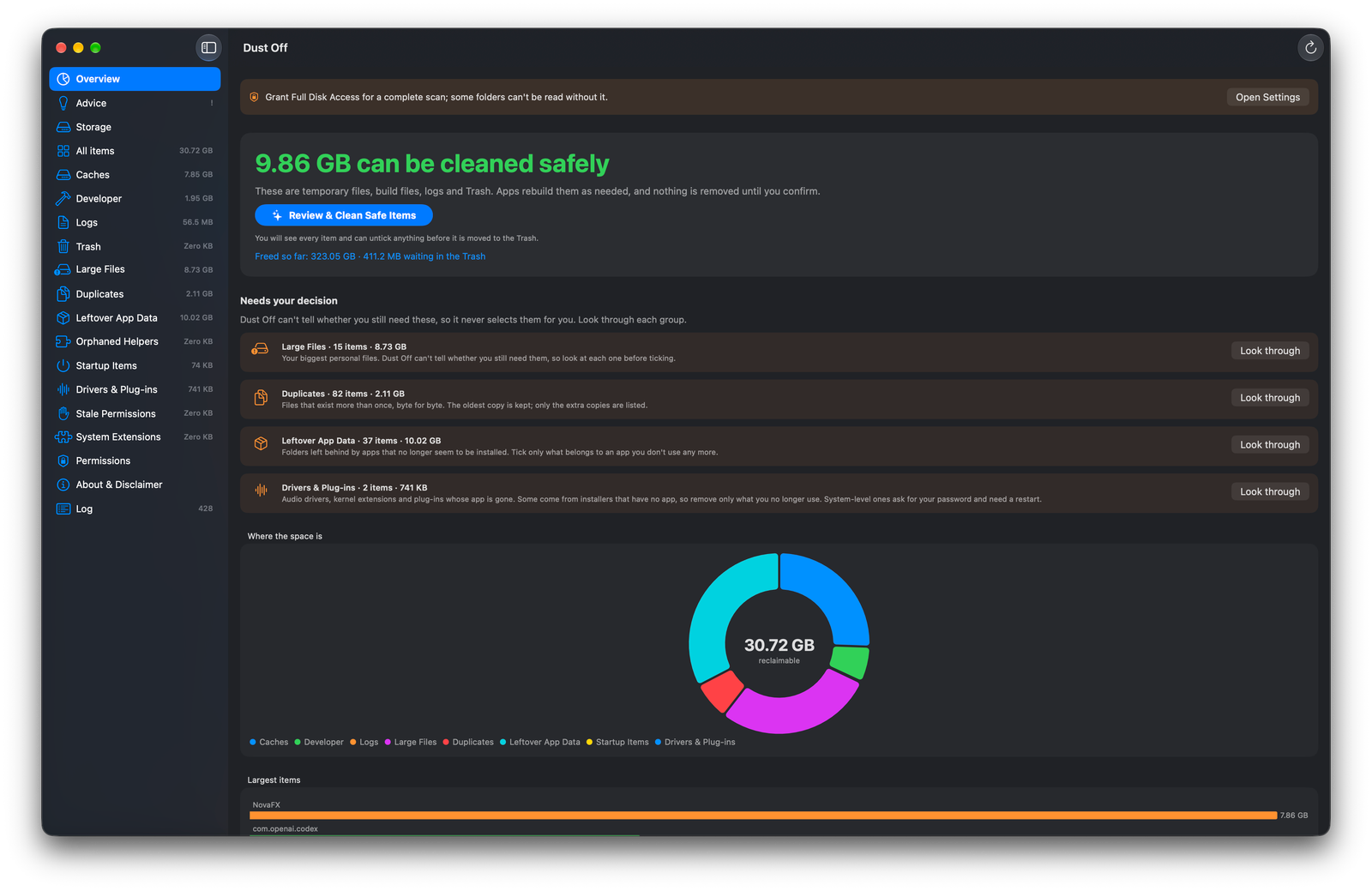
Scan categories, review-first groups and a breakdown of reclaimable space, with a clear Full Disk Access notice.
View full-size screenshot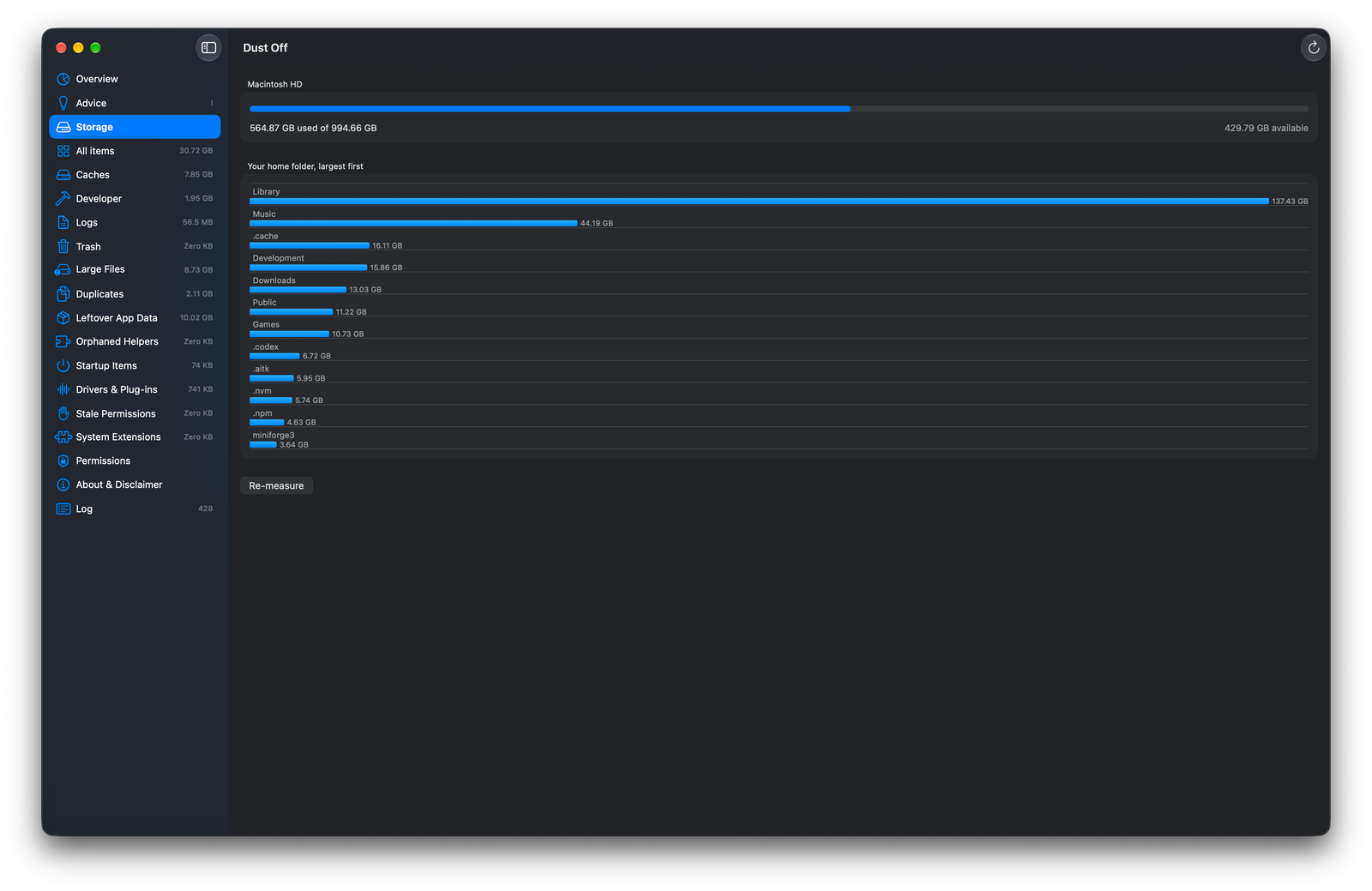
Volume capacity, available space and a largest-first view of home-folder storage usage.
View full-size screenshotDownload Dust Off.
Version 0.1.0 · 1.9 MB. Requires macOS 26 or later on Apple silicon.
The app and disk image are Developer ID signed, Apple notarised and ticket-stapled.
Download Dust Off .dmgInstall on your Mac
- Open the downloaded disk image.
- Drag the app into Applications.
- Open the app from Applications.
Full Disk Access is needed for complete scans. Review every selection; emptying the Trash permanently removes files. Back up important data before cleanup.
Download SHA-256 checksumThe product
Dust Off scans for reclaimable storage and leftover app components, then explains the findings in plain language. Its interface separates routinely regenerated files from personal files and heuristic matches that need closer review.
Scan, select, review
Nothing starts selected. A read-only scan feeds an overview, category lists, an action bar and a final review sheet before removal. Cleaning runs with progress feedback and a summary of items trashed, space reclaimed and any administrator steps.
Routine cleanup
Caches, logs, Xcode DerivedData and items already in the Trash are presented separately from personal files.
Needs your decision
Large files, byte-identical duplicates, leftover app data, orphaned helpers and startup items use review-first labels. Duplicate detection uses SHA-256 and lists extras while retaining the oldest copy.
System leftovers
Drivers, plug-ins, stale permissions and system extensions have distinct handling. Detection is heuristic; some installer-provided components may still be needed.
Storage, permissions and history
Storage shows volume usage and large home folders. Permissions explains access requirements. A persistent log records actions, paths, sizes and outcomes.
Safety as an implementation boundary
The cleanup engine checks allowed paths rather than accepting arbitrary removal requests. Review-first categories are never selected for the user.
Trash before permanent removal
Ordinary files move to the Trash. Removing existing Trash items is permanent; an optional final-empty step targets only the newly trashed selection, not the rest of the Trash.
Protect user folders
Personal-file removal is limited to supported large-file and duplicate workflows. Top-level home folders, hidden folders and protected media libraries are excluded.
Bounded administrator actions
System-level removal uses the macOS administrator dialog, restricted paths and refusal rules for Apple-labelled items, symlinks and hidden files. The app does not receive the password.
Explain exceptions
System extensions cannot be removed directly by Dust Off. The app distinguishes guidance and commands from operations it can complete itself.
A testable native core
A Swift Package separates DustOffCore from the SwiftUI interface and native tests. Scanning, safety checks, cleanup, logging, advice, disk measurement and scheduling live outside the view layer.
Core and interface
The core handles data and filesystem decisions; the app provides overview, lists, review sheets, permissions, storage, advice and logging screens.
Local persistence
Cleanup history and scan summaries live in Application Support. Preferences use the app’s defaults domain; scheduling installs a per-user launch agent only when enabled.
Optional background checks
An opt-in schedule scans when due and can notify about useful cleanup or low disk space. It never removes files in the background. Notification delivery remains an unverified part of the documented workflow.
Validation and product limits
The supplied overview records 43 tests in 14 suites, including real launch-agent install/removal and trash-then-empty round trips. Recorded live checks include a read-only scan and an actual cleanup on the developer’s Mac.
Distribution verification
The existing DMG and packaged app were checked for integrity, signing and notarisation before being added to the portfolio.
Important limits
Leftover detection can be wrong, and moving files to the Trash does not free space until they are emptied. Second-Mac, real-driver administrator removal and several permission/notification scenarios remain separate acceptance work.
Future directions
Menu-bar presentation, a dedicated privileged helper, a per-app uninstall workflow, localisation and direct-sales infrastructure are future work.
Explore the project
Based on the Dust Off project overview and the inspected version 0.1.0 distribution artifact. Product status and verification results are recorded snapshots, not new tests performed for this portfolio.